
Asciidoctor.js extensions
When rendering the preview, the extension can load and register your own Asciidoctor.js extensions.
Where extensions live
By convention, extensions are located in .asciidoctor/lib, at the root of your workspace.
The extension recursively loads every .js file found there as an Asciidoctor.js extension.
For example, the following files are all loaded:
-
.asciidoctor/lib/emoji.js -
.asciidoctor/lib/emoji/index.js -
.asciidoctor/lib/foo/bar/baz.js
Enable extension registration
-
In the extension settings, check Enable Asciidoctor.js extensions registration (
asciidoc.extensions.registerWorkspaceExtensions). -
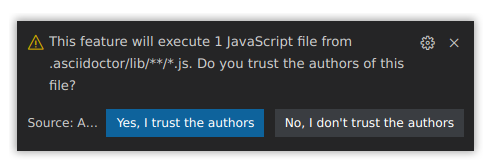
The first time, confirm that you trust the authors of the extensions located in
.asciidoctor/lib.
|
This feature executes JavaScript code. Do not enable it unless you fully trust the authors of the Asciidoctor.js extensions in your workspace. |
|
You can update the trust mode at any time with the Manage Asciidoctor.js Extensions Trust Mode command. |
Example: asciidoctor-emoji
You can write your own extension, or reuse an existing one. Here is how to use the asciidoctor-emoji extension:
-
Install the npm package in the workspace directory:
npm i asciidoctor-emoji -
Create
.asciidoctor/lib/emoji.jswith the following content:module.exports = require('asciidoctor-emoji') -
Write an emoji, for example
:tada:, and watch it render in the preview.

|
The preview’s Content Security Policy allows remote images served over HTTPS by default, so these emojis are not blocked and you do not need to change any security setting. If you ever need to load assets over plain HTTP instead, lower the preview security level with the Manage Preview Security Settings command. |